
-
he graphic interface when using a Survey function with a GNSS receiver is explained in this paragraph.
-
To record points with a GNSS receiver, open the Survey page.
-
Select Survey points.
-
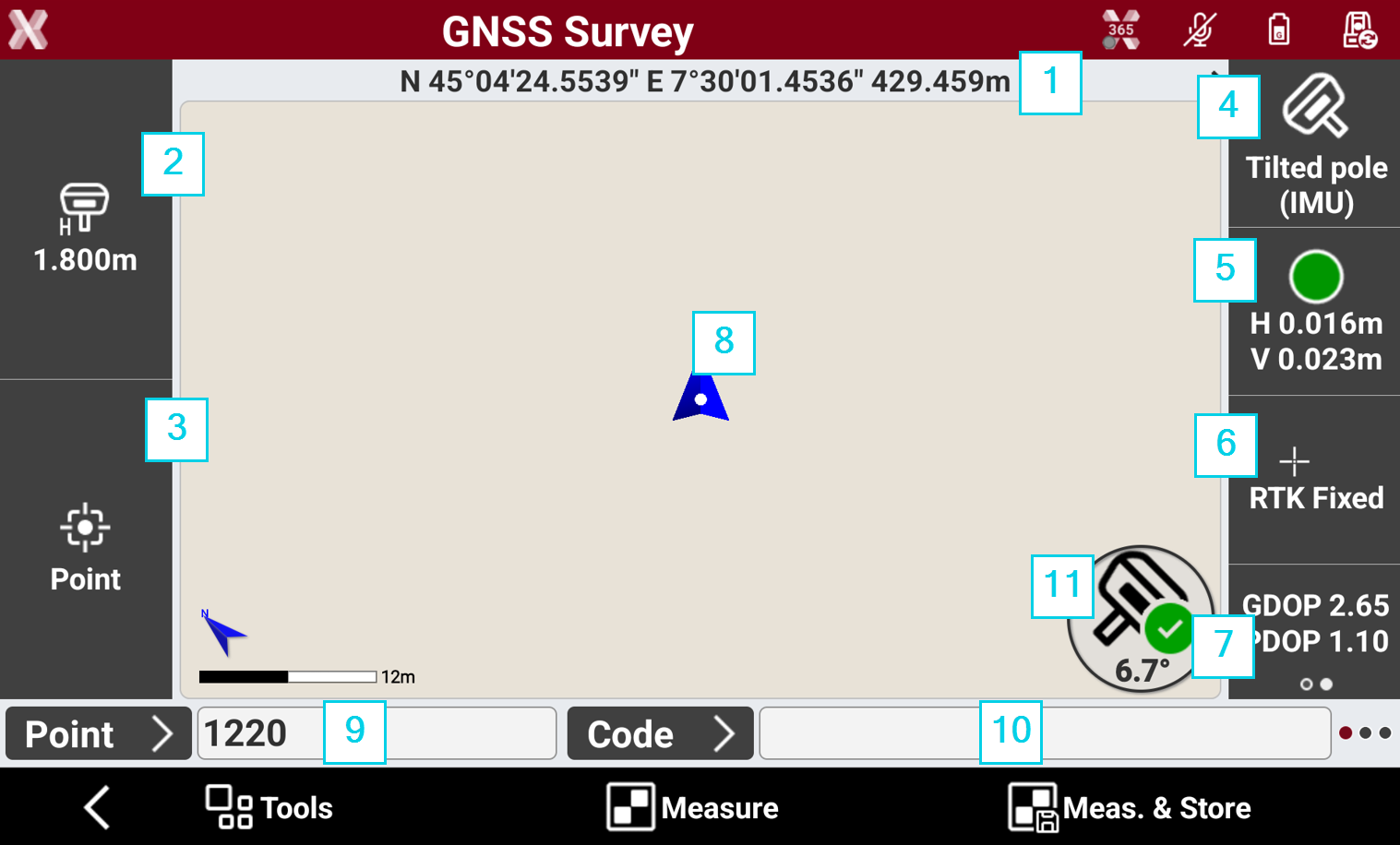
Coordinates: the geographic coordinates (latitude, longitude, elevation) of the receiver. Tap on the bar to change the visualization from geographic coordinates to plane coordinate and to distance and slope from the previous visualization mode.
-
Antenna height: height of the GNSS receiver. Press to change the height.
-
Smart drawing: displays the current status of the function Smart Drawing. Press to open open Smart Drawing Tools.
-
GNSS Measure mode: opens to select the GNSS measure mode.
-
Accuracy: the color of the icons indicates if the precision level set in the GNSS Settings has been reached. The epochs are acquired only when the level of precision has been reached (horizontal and vertical precision, minimum number of satellites, maximum values of DOP, electronic bubble). Below the icon, the current precision values for coordinates (H) and for elevations (V) are displayed.
-
Receiver status: opens the GNSS Status page to show the status information of the GNSS receiver.
-
Satellite/DOP: shows the number of satellites tracked, for constellations GPS, GLONASS, BeiDou, SBAS. Press to display the DOP values.
-
Current position: indicates the current position.
-
Blue: All parameters of operation satisfy the preset level of accuracy.
-
Red: The accuracy parameters are not met.
-
-
Point ID: visualizes the ID of the next point measured, tap in the field to enter a new point ID. The ID follows the rule set in Points name page in GNSS Settings. Press Point button to open the Topographic points list.
-
Code: visualizes the survey code, tap in the field to enter a new survey code. Press Code button to open the Survey codes list, or change visualization to Quick codes toolbar.
-
Pole mode: available if the GNSS receiver has IMU. Selects the pole working mode.
-
Pole vertical: the pole tilt is not compensated.
-
Tilted pole: the pole tilt is compensated. The icon shows the current pole tilt angle.
-
E-bubble: activates the e-bubble using the sensors of the GNSS receiver. The pole tilt is not compensated but visualizes on screen the pole bubble.
-