
GIS
-
The optional module GIS allows to create and use GIS features.
-
A GIS feature consists in a group of properties which describe the elements of the measured area.
-
The GIS features are used to measure and describe elements of the measured area with the scope to create a GIS system.
-
Example of GIS features:
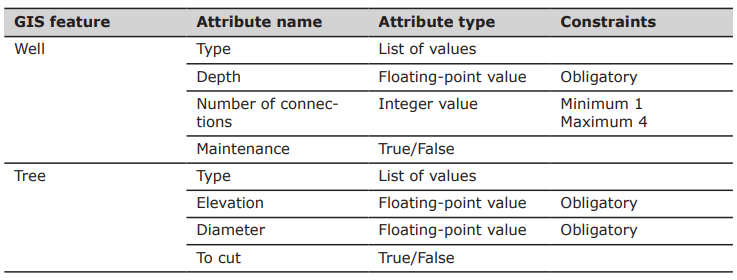
-
-
The library of GIS features with the corresponding attributes is user-definable.
-
Every GIS feature is associated to a survey code.
-
During a survey:
-
Saving a point: the software checks the survey code associated with the measured point. If a GIS feature is linked to the survey code, a window is displayed to allow entry of the corresponding attributes.
-
Saving a line: the attributes can be assigned to the first point of the line, to all points or to the last point of the line. In most cases, the last point of the line is the best solution because more information about the line are available. The option GIS line attributes is available in TPS Survey Settings and GNSS Survey settings.
-
-
All information associated to points can be exported in different ways. For example as ESRI Shape file, as labels in the DXF export or in an ASCII file.
-
This chapter covers the following topics:
-
GIS features manager: learn how to create, organize, and manage GIS feature definitions used during data collection.
-
Create/edit GIS features: learn how to create new GIS features.
-
Assign a GIS feature to a code step-by-step: learn how to associate a GIS feature with a survey code.
-