
-
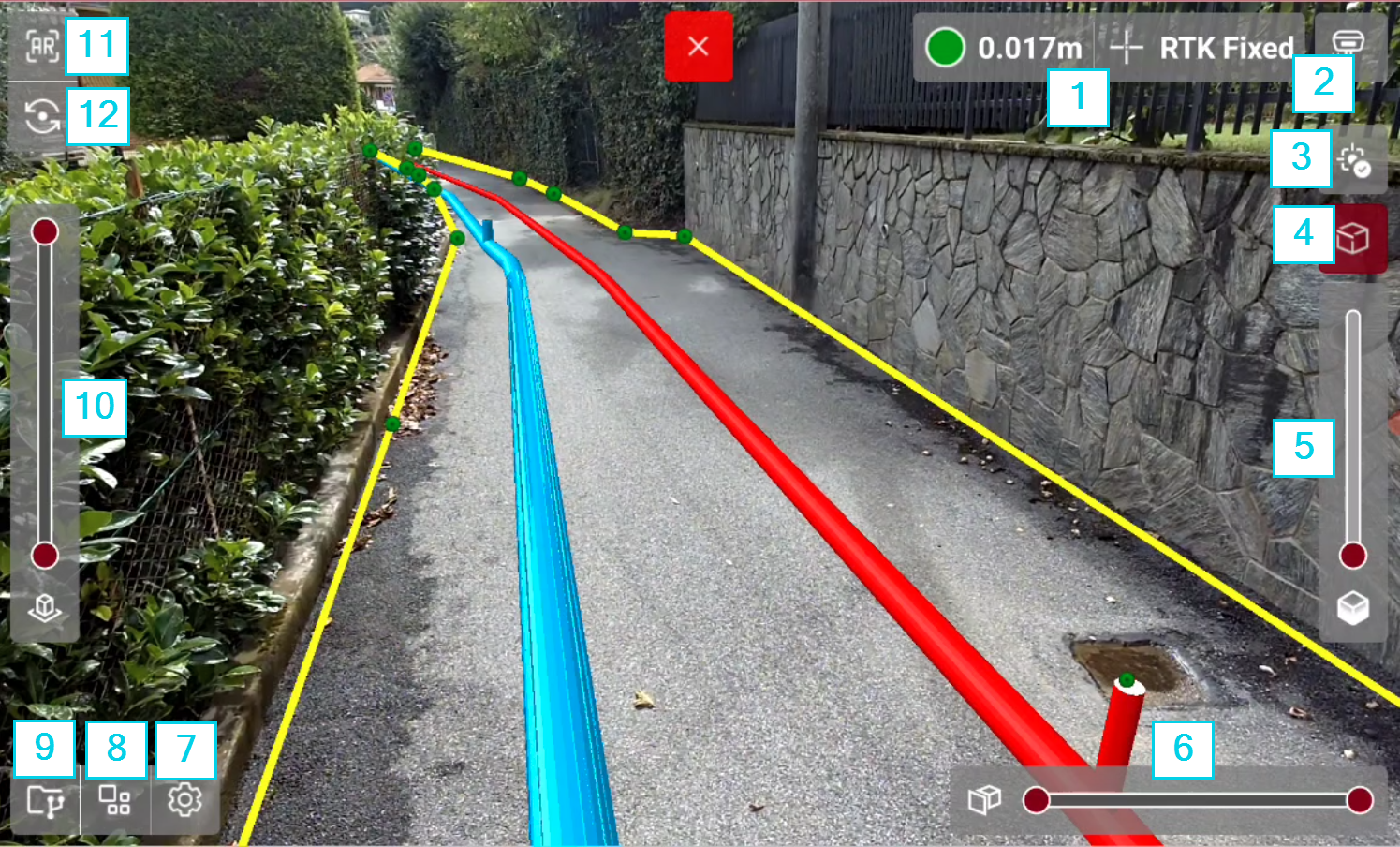
The graphic interface when using X-PLORE function with a GNSS receiver is explained in this chapter.
-
GNSS Status: shows the GNSS receiver accuracy and status. To work X-PLORE requires the receiver to be in fix status. Press the bar to open the GNSS Status.
-
Pole height: allows to change the pole height.
-
Point visualization: changes the visualization of topographic points. Allows to show/hide the points and the points labels.
-
3D render: changes the rendering of 3D entities.
-
Transparency slider: changes the transparency of IFC models and surfaces.
-
Cut planes slider: allows to define a vertical cutting plane according to the distance from the observer.
-
Settings: opens the X-PLORE settings.
-
Tools: opens the X-PLORE tools.
-
Project manager: opens the project manager.
-
Elevation slider: allows to define an horizontal cutting plane at different elevation.
-
View mode: allows to change the view mode, from AR to 2D and 3D.
-
AR setting: if working with a GNSS receiver with cameras, changes the camera view from front camera to bottom camera. If working with a GNSS receiver with IMU and without cameras, allows to configure the camera offsets. For more information see Working with augmented reality.