
-
Leica X-PAD offers multiple tools for the automatic management of software licenses.
-
User has the possibility to update or transfer a license without external support.
View the license status
-
In License page it is possible to check the status of the license.
-
Press the X-PAD logo on top-left of main screen.

-
Open the License page.
-
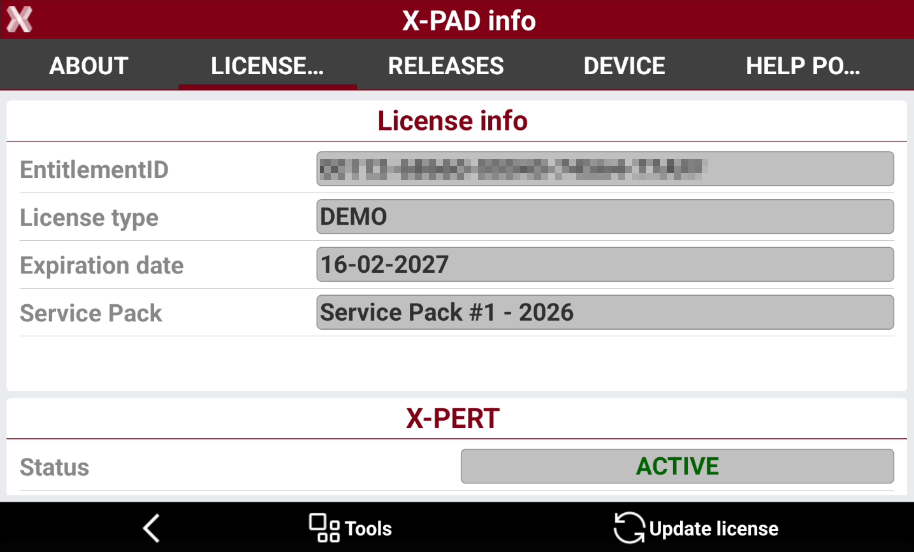
Here you can find information regarding the status of the license.
-
Entitlement ID: the license number. (in case of old license model instead of the Entitlement ID the values visualized are Equipment ID and Serial number)
-
License type: the type of license, if permanent or demo.
-
Service pack: the latest service pack that is possible to download for the license. This depends on CCP status.
-
-
Under CCP section it is possible to find information regarding the CCP status.
-
Status: if the CCP is active or expired.
-
Expiration date: the expiration date for CCP.
-
-
Under Modules section it is possible to find information on the active modules.
For demo licenses it is possible to manually enable/disable single modules or simulate a service pack version.
Update license information
An internet connection is required.
-
In case a new module or a subscription for an existing license has been ordered, it is necessary to update online the license.
-
Press X-PAD logo on top-left of main screen.
-
Open the License page.
-
Press Update license to update online the license information.
Transfer the license to a new controller
An internet connection is required.
In case the initial controller is broken and license cannot be removed, please contact the technical support.
-
X-PAD offers the possibility to transfer the license from the current device to a new device.
-
Press the X-PAD logo on top-left of main screen.
-
Open the License page.
-
Record the license number. This will be used to activate again the license on the new controller.
-
Press Tools and select Rehost license. This operation removes the license from the current controller.
-
Install the software on the new controller and activate the license with same license number.