
Windows Android
-
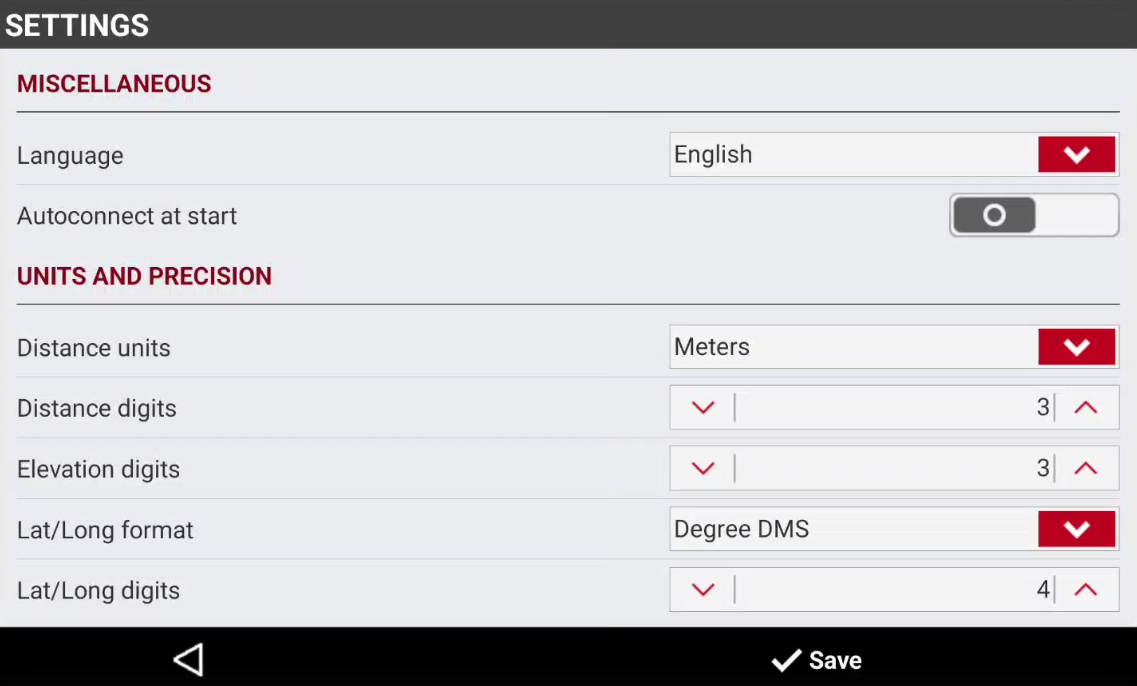
The Settings page allows to change software language and other settings.
-
Android To change application Settings, tap on top-right icon

-
Windows To change application Settings, click Settings on top-right bar.
-
Select Settings.
-
Language: changes application language.
-
Autoconnect at start: if enabled, automatically connects latest connected instrument to X-PAD Connect.
-
Distance units: defines the unit used to measure distances.
-
Distance digits: specifies the number of decimal places used for distance values.
-
Elevation digits: specifies the number of decimal places used for elevation values.
-
Lat/Long format: defines the format used for latitude and longitude.
-
Lat/Long digits: specifies the number of decimal places used for latitude and longitude values.
-
Angle format: defines the unit used to measure angles.
-
Angle digits: specifies the number of decimal places used for angle values.
-
Android Write file: if enabled, the application saves the NMEA data received from GNSS receiver in a file stored in Download/XPADConnect/NMEA.
-
Android File name: available is Write file is enabled, specifies the NMEA file name.
-
-
Press Save to save the settings.