
Windows Android
-
The Configuration page displays the current GNSS receiver configuration.
-
It is possible to reconfigure the receiver, or save/load different configurations.
-
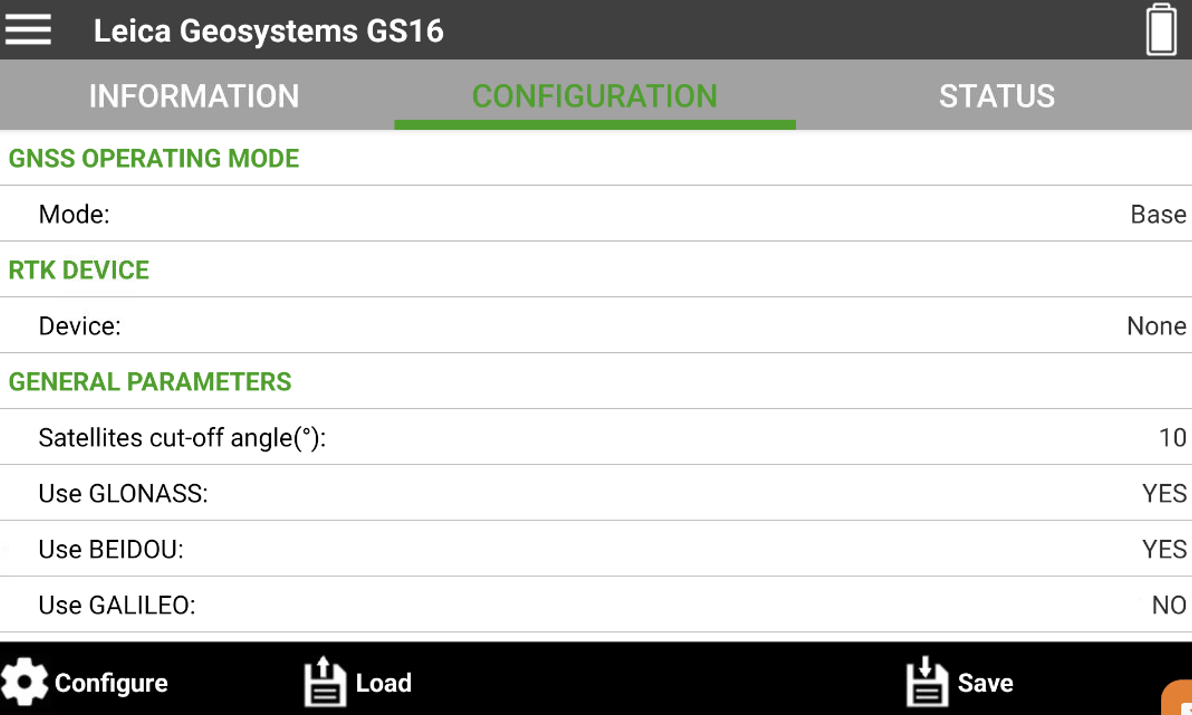
After a GNSS receiver is connected to the application by Bluetooth, open the Configuration tab to display the current GNSS receiver configuration.
-
GNSS operating mode: specifies if the GNSS receiver is configured as base or rover.
-
RTK device: the datalink used to receive or transmit RTK corrections.
-
General parameters: the general parameters of the configuration.
-
Creating a new profile
-
To create a new profile select Configure.
-
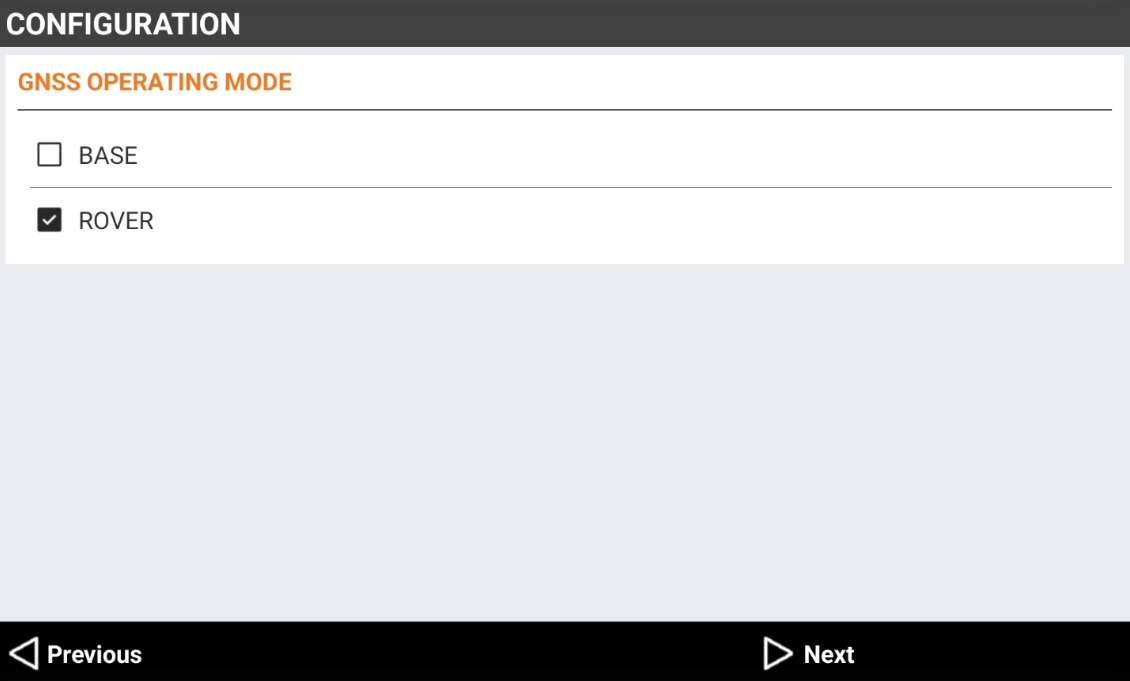
The GNSS operating mode page allows to define if the receiver is working as base or rover.
-
Select the GNSS operating mode:
-
Base: the receiver is configured to work as base.
-
Rover: the receiver is configured to work as rover.
-
-
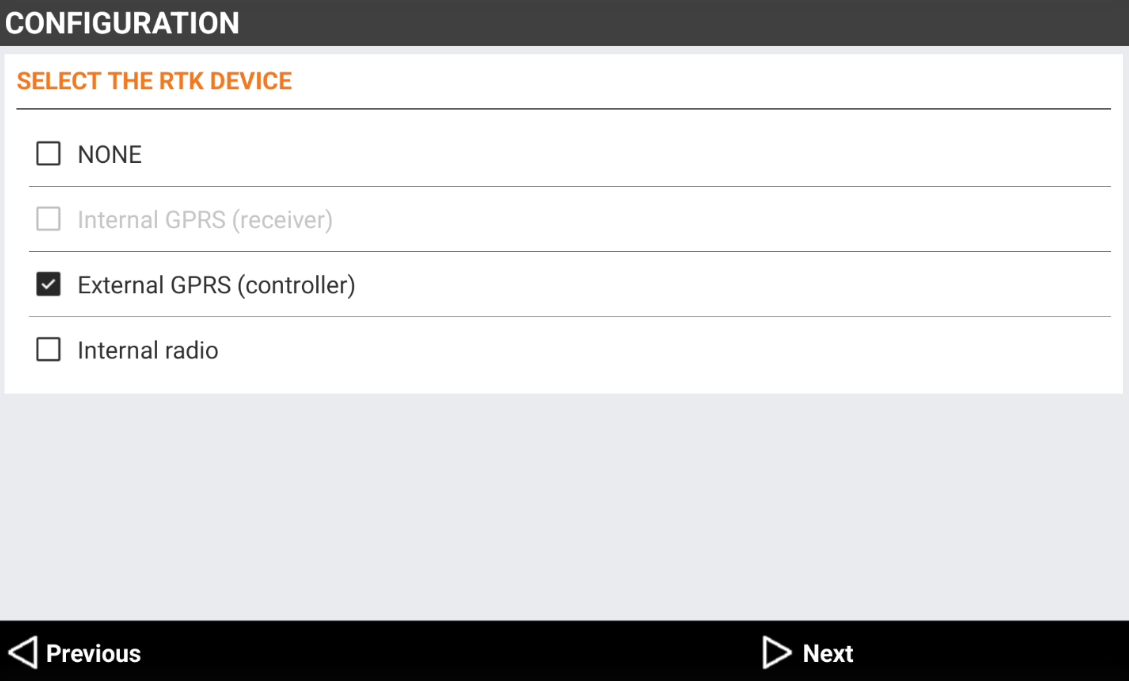
The RTK device page allows to define the datalink used to receiver or transmit RTK corrections.
-
Select the RTK device:
-
None: no RTK corrections are receiver. The receiver works in autonomous mode.
-
Internal GPRS (receiver): the GNSS receiver utilizes the internal GPRS modem to transmit or receive RTK corrections.
-
External GPRS (controller): the GNSS receiver utilizes internet from the field controller to transmit or receive RTK corrections.
-
Internal radio: the GNSS receiver utilizes the internal radio of receiver to transmit or receive RTK corrections.
-
External radio: the GNSS receiver utilizes an external radio to transmit RTK corrections.
-
-
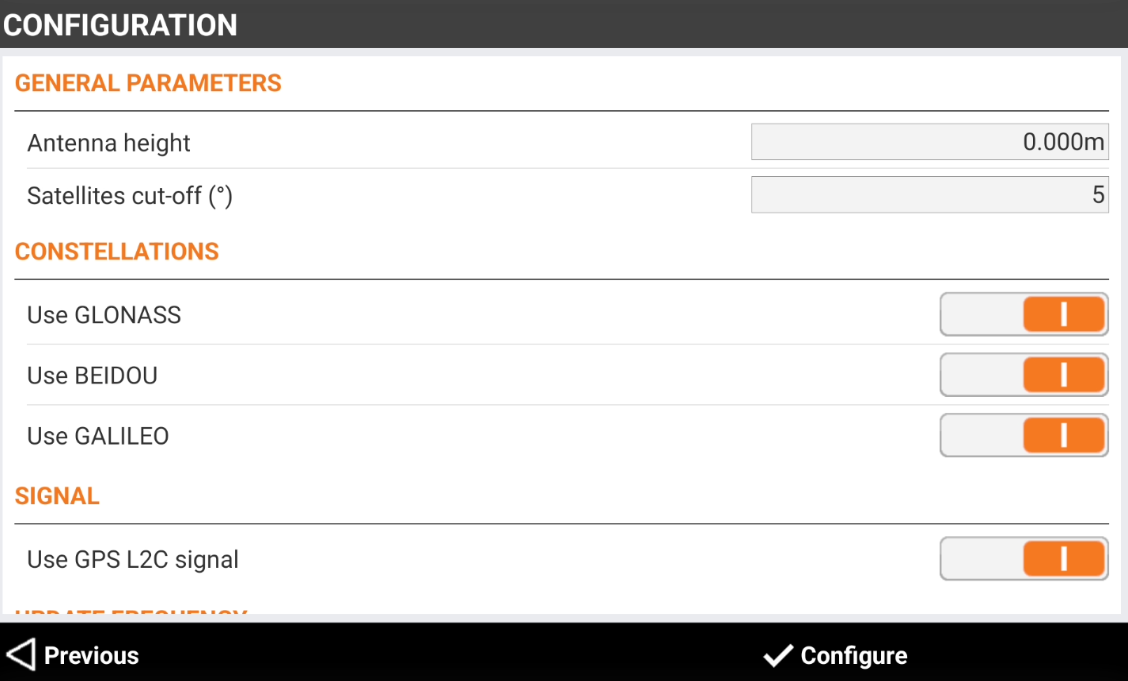
The following page allows to configure the general receiver parameters. The available options depends on connected receiver.
-
Antenna height: the GNSS receiver antenna height.
-
Satellites Cut-off angle(°): minimum elevation above the horizon in degrees to consider satellites usable. To increase precision by avoiding satellites too low above the horizon.
-
Use GLONASS: enables the use of satellites in the GLONASS constellation.
-
Use GALILEO: enables the use of satellites in the GALILEO constellation.
-
Use BEIDOU: enables the use of satellites in the BeiDou constellation.
-
Use GPS L2C signal: enables the tracking of GPS L2C signal.
-
Position update freq.: frequency with which the value of the position is updated.
-
-
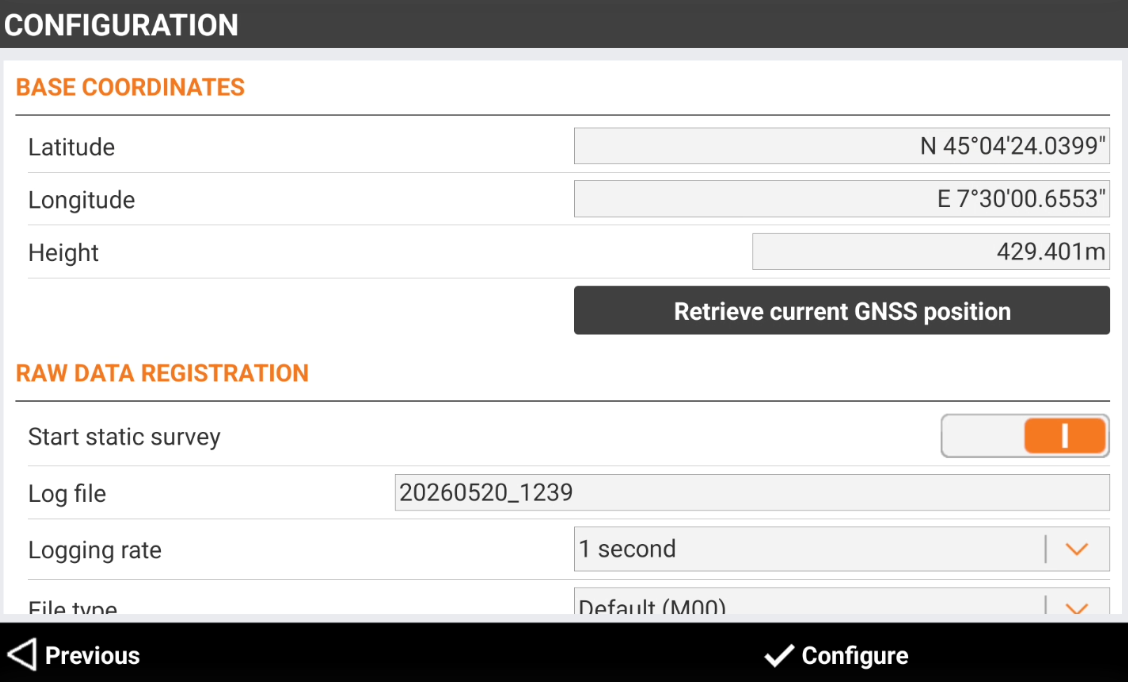
If the profile is a Base profile, the following page allows to start the GNSS base.
-
Latitude: the latitude of the base position.
-
Longitude: the longitude of the base position.
-
Height: the elevation of the base position.
-
Retrieve current GNSS position: press this button to retrieve the approximate position from the GNSS receiver.
-
Start static survey: enables the recording of raw data when base is started.
-
Log file: name of the raw data file.
-
Logging rate: select the raw data file logging rate.
-
File type: the raw data file type. It is possible to select if format is proprietary or standard RINEX.
-
Memory free: shows the available free memory on GNSS receiver.
-
-
Press Configure to configure the connected GNSS receiver. If profile is a base, the base is started.
Save/Load a profile
-
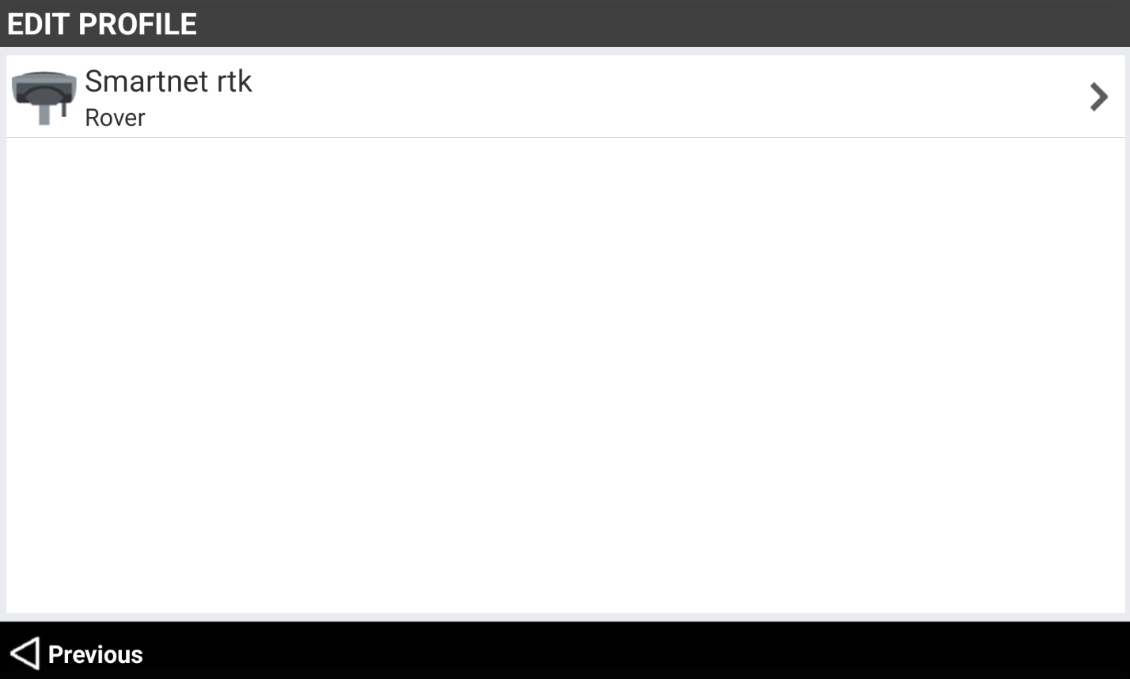
It is possible to save a configuration profile to be loaded in a second time.
-
To save a configuration profile select Save. Enter the name of the profile.
-
To load a saved profile, select Load and select the profile from the list of saved profiles.
Internal GPRS (receiver) settings
-
This page allows to configure internet connection when the SIM card is inside the GNSS receiver.
-
Provider: APN utilized by the phone provider providing GPRS service. Select Providers… from the list to define a new provider or to modify parameters of an existing provider.
-
Server: service utilized to transmit or receive RTK corrections using internet. Select NTRIP servers… from the list to define a new service or to modify parameters of an existing service.
-
NTRIP: name of the permanent station service to connect using the NTRIP protocol.
-
CSD (Direct call): name of the profile.
-
Point to point: allows to receive RTK corrections directly from an IP address and port, not using the NTRIP protocol.
-
-
Mountpoint: name of mountpoint to use. Type in the name or select from a list. Only if an NTRIP server has been set.
-
Network type: type of network corrections to use. Only if an NTRIP server has been set. This field is available only for certain models.
-
Correction format: format of corrections. Set the same data format sent by permanent station (source). For multi-constellation receivers it is recommended to work with RTCM3 MSM protocol.
-
Send GPUID to server: if enabled, transmit an ID to the server, defined the in the fields Job ID and User ID.
-
GPRS Provider
-
To create or edit a GPRS provider select Providers… from the Provider list.
-
This opens the Providers page.
-
Name: description of the provider.
-
APN Server: name of the access point for GPRS and UMTS nets.
-
User ID: identification of the user to access the service. Necessary if the access is protected by a user ID and a password.
-
Password: set the password to access the service. Necessary if the access is protected by a user ID and a password.
-
PIN: PIN to use the SIM card.
-
-
Select Accept to save the provider.
NTRIP server
-
NTRIP is the most common method to receive RTK corrections.
-
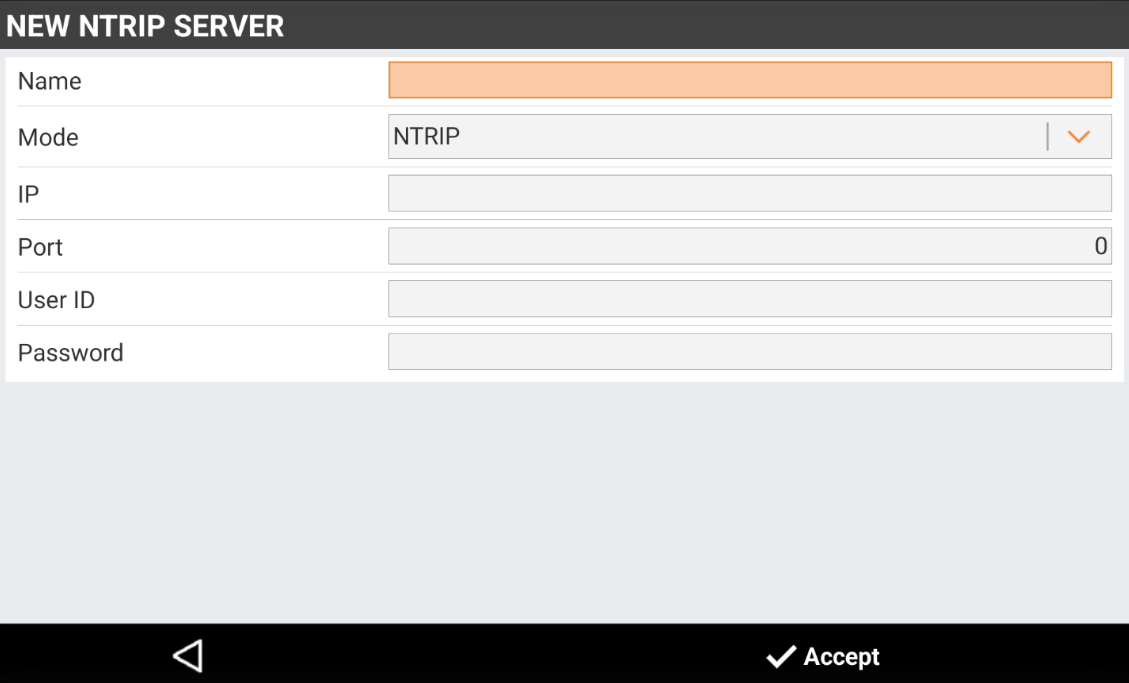
Select NTRIP servers… from the Server list to define a new service or to modify parameters of an existing service.
-
Name: description of the server.
-
Mode: select NTRIP.
-
IP: IP address where the service answers. Provided when you register yourself to the service.
-
Port: number of the port used. Provided when you register yourself to the service.
-
UserID: identification of the user registered to the service. Provided when you register yourself to the service.
-
Password: password assigned to the registered user by the service. Provided when you register yourself to the service.
-
PPP (Point to point)
-
Allows to set the IP address and the port number for the connection to receive corrections.
-
Point to point connection allows to receive RTK corrections directly from an IP address and port, not using the NTRIP protocol.
-
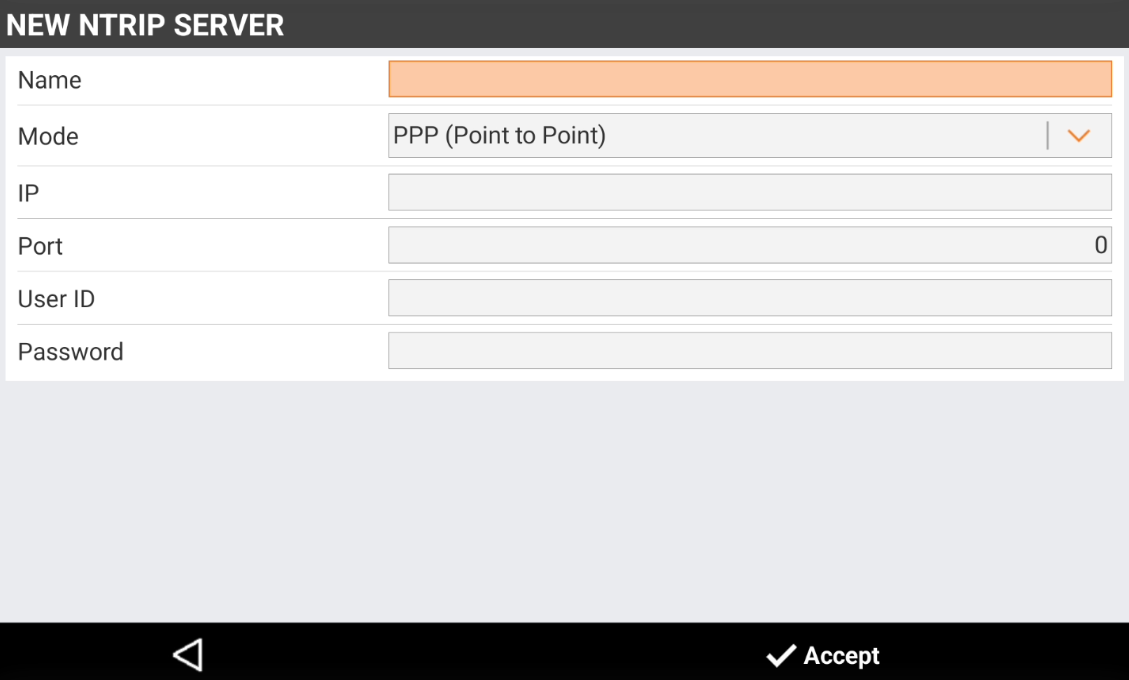
Select NTRIP servers… from the Server list to define a new service or to modify parameters of an existing service.
-
Name: description of the profile.
-
Mode: select PPP (Point to Point).
-
IP: IP address to use.
-
Port: number of the port to use.
-
UserID: identification of the user registered to the service.
-
Password: password assigned to the registered user by the service.
-
CSD (Direct call)
-
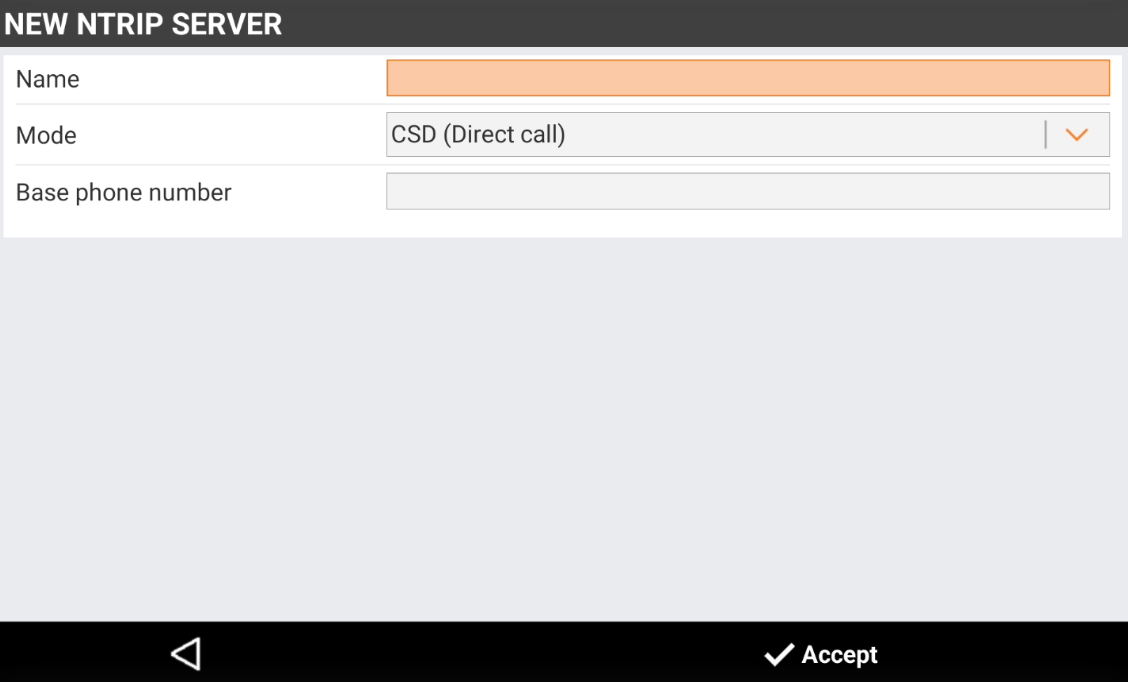
A direct call profile allows setting the telephone number of the SIM card used by the base. It allows the rover to receive corrections from the base using the modem GPRS instead of radio.
-
Name: description of the profile.
-
Mode: select CSD (Direct call).
-
Base phone number: telephone number of the SIM used by the base.
-
Mountpoints list
-
An NTRIP mountpoint is a specific data stream within an NTRIP (Networked Transport of RTCM via Internet Protocol) system.
-
It represents a unique connection point on an NTRIP caster, providing access to real-time correction data.
-
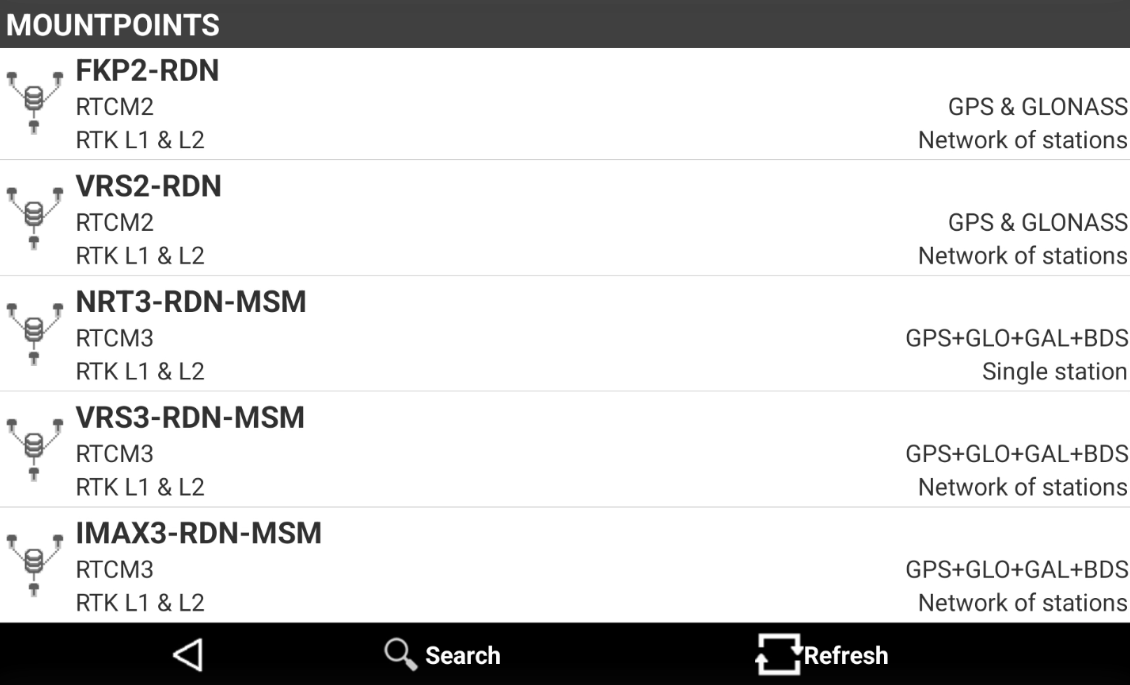
Normally an NTRIP system provides different mountpoints with different parameters (data format, single station or network corrections).
-
The Mountpoints page shows the list of mountpoints available for the current NTRIP server.
-
Select Search to search a specific mountpoint from the list.
-
Select Refresh to download the list from the network.
External GPRS (controller) settings
-
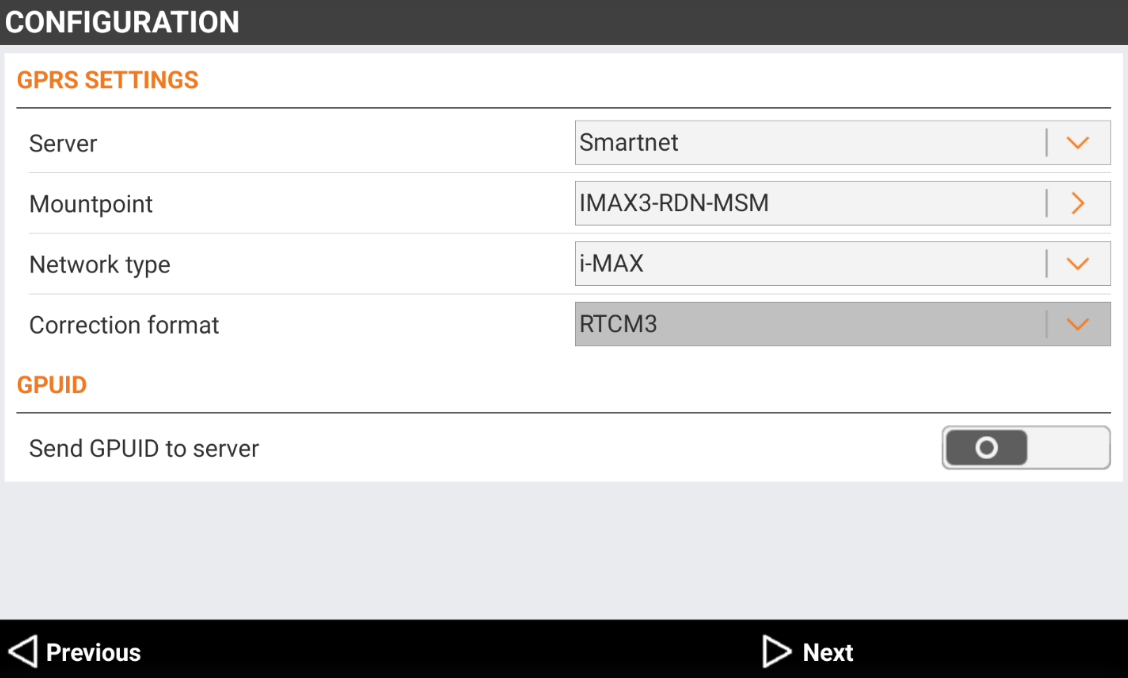
This page allows to configure internet connection when the internet is provided by the field controller.
-
Server: service utilized to transmit or receive RTK corrections using internet. Select NTRIP servers… from the list to define a new service or to modify parameters of an existing service.
-
NTRIP: name of the permanent station service to connect using the NTRIP protocol.
-
CSD (Direct call): name of the profile.
-
Point to point: allows to receive RTK corrections directly from an IP address and port, not using the NTRIP protocol.
-
-
Mountpoint: name of mountpoint to use. Type in the name or select from a list. Only if an NTRIP server has been set.
-
Network type: type of network corrections to use. Only if an NTRIP server has been set. This field is available only for certain models.
-
Correction format: format of corrections. Set the same data format sent by permanent station (source). For multi-constellation receivers it is recommended to work with RTCM3 MSM protocol.
-
Send GPUID to server: if enabled, transmit an ID to the server, defined the in the fields Job ID and User ID.
-
NTRIP server
-
NTRIP is the most common method to receive RTK corrections.
-
Select NTRIP servers… from the Server list to define a new service or to modify parameters of an existing service.
-
Name: description of the server.
-
Mode: select NTRIP.
-
IP: IP address where the service answers. Provided when you register yourself to the service.
-
Port: number of the port used. Provided when you register yourself to the service.
-
UserID: identification of the user registered to the service. Provided when you register yourself to the service.
-
Password: password assigned to the registered user by the service. Provided when you register yourself to the service.
-
PPP (Point to point)
-
Allows to set the IP address and the port number for the connection to receive corrections.
-
Point to point connection allows to receive RTK corrections directly from an IP address and port, not using the NTRIP protocol.
-
Select NTRIP servers… from the Server list to define a new service or to modify parameters of an existing service.
-
Name: description of the profile.
-
Mode: select PPP (Point to Point).
-
IP: IP address to use.
-
Port: number of the port to use.
-
UserID: identification of the user registered to the service.
-
Password: password assigned to the registered user by the service.
-
CSD (Direct call)
-
A direct call profile allows setting the telephone number of the SIM card used by the base. It allows the rover to receive corrections from the base using the modem GPRS instead of radio.
-
Name: description of the profile.
-
Mode: select CSD (Direct call).
-
Base phone number: telephone number of the SIM used by the base.
-
Mountpoints list
-
An NTRIP mountpoint is a specific data stream within an NTRIP (Networked Transport of RTCM via Internet Protocol) system.
-
It represents a unique connection point on an NTRIP caster, providing access to real-time correction data.
-
Normally an NTRIP system provides different mountpoints with different parameters (data format, single station or network corrections).
-
The Mountpoints page shows the list of mountpoints available for the current NTRIP server.
-
Select Search to search a specific mountpoint from the list.
-
Select Refresh to download the list from the network.
Internal radio settings
In order to accomplish radio regulations active in several countries, the access to some advanced settings (radio frequencies and spacing) are protected with a password. Please contact your distributor or technical support for more information.
-
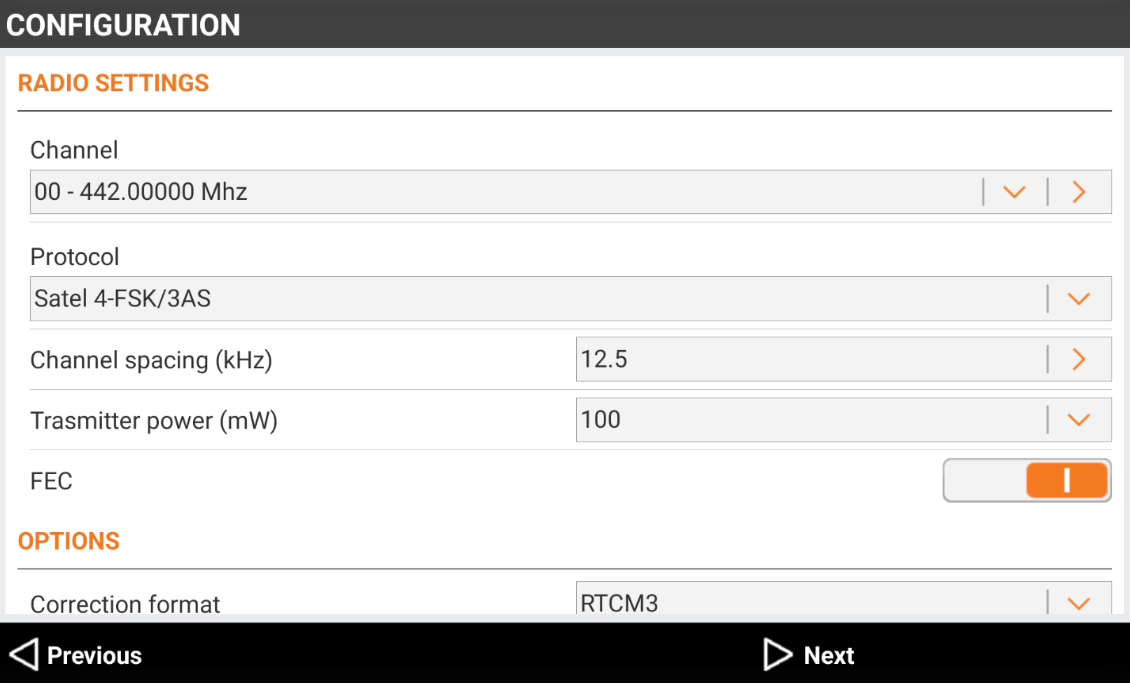
This page is available if the RTK datalink selected is Internal radio.
-
Channel: the radio channel. Each channel works on a specific frequency. Tap on > to edit the frequencies for each channel.
-
Protocol: the radio protocol.
-
Channel spacing: the radio communication channel spacing.
-
Transmitting power: the radio transmitting power.
-
FEC (Forward Error Correction): improves the reliability of data transfer over the radio by adding additional correction information to the messages. If enabled on the base, it must also be enabled on the rover.
-
Format: select the corrections format. Base and rover must use the same format. For GNSS receiver with multi-constellation it is recommended to work with RTCM3 MSM format.
-
Use Base ID:
-
For Rover: sets the receiver to receive the corrections only from the base identified by the specified Base ID.
-
For Base: sets the name of the base. Base ID Identification of the base.
-
-
Use FCC regulation: allows to enter Interval and Call sign ID to comply with Federal Communications Commission (FCC).
-
External radio settings
When working with an external radio, the radio parameters such as frequency, protocol and spacing are configured on the external radio. Please refer to the radio user manual for more information.
-
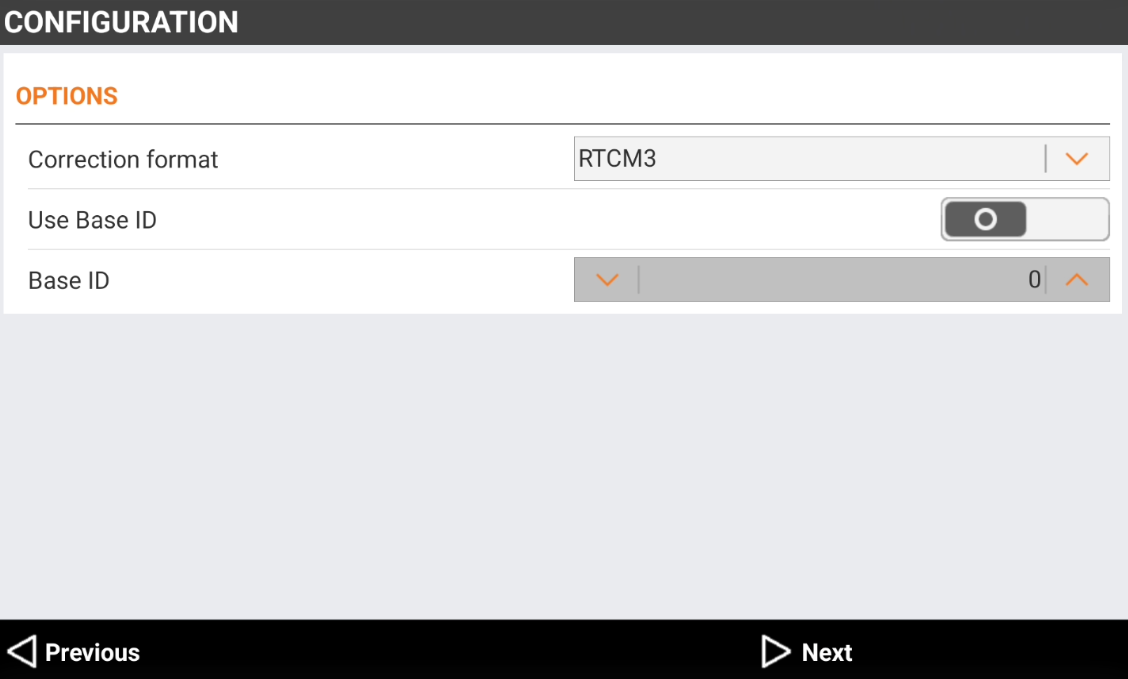
This page is available if the RTK datalink selected is External radio. The profile is a base profile.
-
Correction format: select the corrections format. Base and rover must use the same format. For GNSS receiver with multi-constellation it is recommended to work with RTCM3 MSM format.
-
Use Base ID:
-
For Rover: sets the receiver to receive the corrections only from the base identified by the specified Base ID.
-
For Base: sets the name of the base. Base ID Identification of the base.
-
-